
Work Orders & Events
Promote Your Program or Event
Your one-stop hub for submitting marketing requests and event listings. Please review the information below before submitting your request to help us serve you efficiently.
Submit a Marketing Work Order
All marketing support requests start with a work order using our Smartsheet form.
Please do not email individual team members — this ensures your project is tracked, assigned, and scheduled according to staff
availability and department priorities.
Work Order Categories
-
Announcement & Marketing Campaign – Request email blasts, Students’ Message posts, Parliament messages, or social media posts to promote your program or event.
-
Design – Get help creating flyers, posters, postcards, promotional items, or digital graphics for campus and community audiences.
-
Web – Request updates to existing pages, new pages, or forms on the Foothill College website.
Submit a Marketing Work Order
Submit an Event Calendar Entry
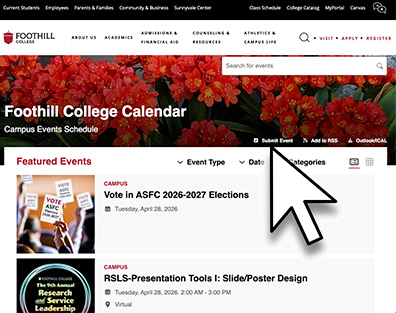
The Foothill Events Calendar is managed by the Foothill Marketing Office to promote on-campus or virtual Foothill events and activities open to students and other community members.
Who to Contact
-
If you are a student club organizer, email your event details to Victoria Strelnikova at strelnikovavictoria@fhda.edu (ICC Advisor).
-
If this is an event for faculty and/or staff only, email Simon Pennington at penningtonsimon@fhda.edu and Edna H. Amezcua at hernandezamezcuaedna@fhda.edu to include your event in Parliament or Student's Message.
The Foothill Events Calendar at foothill.edu/events is managed by the Foothill Marketing Office to promote on-campus or virtual Foothill events and activities open to students and other community members.
Submit an Event
Promote your event on the Foothill College website by submitting it through the Events Calendar.
Go to Events Calendar → Submit Event and complete all required fields.
Requirements
- Use a valid Foothill College email (non-Foothill emails will not be approved)
- Include event details: title, date, time, location, and description
- Add a link and clear call to action (Register, Learn more)
- Select a category to have your event appear on your program or department page
Categories
- Choose the most appropriate category
- Do not create new categories
- Request a new category from marketing at: websupport@fhda.edu
Image Guidelines
- 600 × 600 px
- No text or logos
Timeline
- Events are reviewed at 9:00 a.m. and 1:00 p.m.
- Published within approximately 1 hour after approval
- Events are removed after they pass (same or next day)
Submit early and keep track of your request to ensure timely publication.
Marketing Questions?
Please email websupport@fhda.edu.

Contact UsMarketing & Public RelationsBuilding 1900marketing@foothill.edu |
