
Can't Find My Course
Missing a Canvas Course?
There are a few reasons that your course is not appearing on the Canvas Dashboard.
Follow the instructions below to Add Course to the Dashboard.
- Students should contact the instructor to confirm when they plan to publish the course.
- Instructors should see the course in the unpublished section on the Dashboard. If the course is not present then it has likely not been activated. For more information visit - Activate My Live Site.
Check the class schedule to confirm when the course is supposed to start.
Add Course to the Dashboard
- Log in to Canvas.
- Select Courses from the global navigation menu.
- Select All Courses.
- Check the star next to your course to make is a favorite and have it appear on the dashboard. To remove the course from the dashboard uncheck the star.
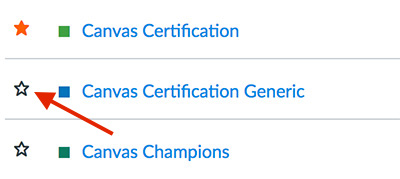
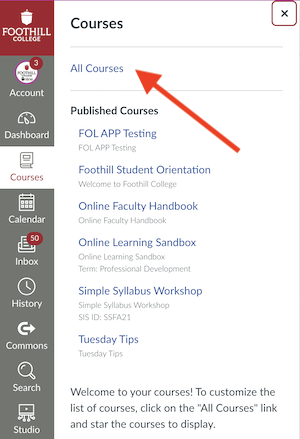
If you do not see your course on the dashboard, you can find it under courses. another possibility is that your instructor has not published your course. Once they do it will appear on your dashboard.

Contact UsOnline Learning Officeonlinelearning@foothill.eduCanvas Help Hotline 24/7 833.300.3461 Check Canvas Status Admissions and Records 650.949.7325 |
