Canvas Login Instructions
Mobile Log In
You can download the Canvas App and log in to access your courses. If you are associated
with different colleges that use Canvas, you can only log in to one college at a time.
Download the Canvas App
Log in to the Canvas App
Browser Log In
Students, you can only log into Canvas AFTER you have enrolled in a course that uses Canvas.
There are two methods you can use to log into Canvas.
- Log in through Foothill College Canvas login webpage.
- Log in through MyPortal.
Method 1: Foothill College Login webpage
Both students and faculty may log into Canvas through the Foothill College login webpage.
- Go to https://foothillcollege.instructure.com
- Type in your college ID number and password that you use to log into MyPortal
Method 2: Log in through MyPortal
Students
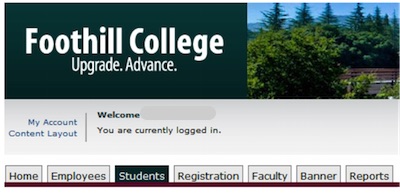
- Login to MyPortal (https://myportal.fhda.edu) using your Student ID Number and Password
- Click on the Students tab
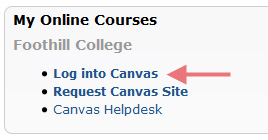
- Look for Look for My Online Courses
- Click on the 'Log into Canvas' link
Note: The link will only appear after your instructor has made the course site available and/or at the start of the quarter.
Faculty
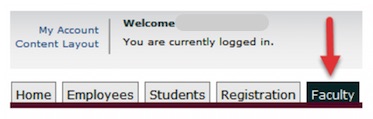
- Login to MyPortal (https://myportal.fhda.edu) using your Campus Wide ID Number and Password
- Click on the Faculty tab
- Look for My Online Courses
- Click on "Log into Canvas"